Elasticsearch 慢日志
搜索和索引是 Elasticsearch 的两种主要请求类型,启用 Elasticsearch 慢日志有助于识别有问题的索引。在 Elasticsearch 索引中配置慢日志阈值,并使用 Site24x7 的 AppLogs 监控慢搜索和索引日志。我们的专属仪表板帮助您找到最佳优化查询。
启用 Elasticsearch 慢日志
默认情况下,Elasticsearch 中的慢日志处于禁用状态。要启用日志记录,您必须配置 Elasticsearch 索引设置 API 并为慢搜索或索引日志设置阈值。您可以定义三种阈值类型:
- 索引(index)
- 搜索的查询阶段(query)
- 搜索的获取阶段(fetch)
启用慢搜索日志的日志记录:
查询和获取是搜索过程的两个主要阶段,您可以为这两个执行阶段设置阈值。
curl -X PUT "<Elasticsearch_domain>/<Index>/_settings?pretty" -H 'Content-Type: application/json' -d' {
 "index.search.slowlog.threshold.query.warn": "0ms",
 "index.search.slowlog.threshold.query.info": "0ms",
 "index.search.slowlog.threshold.query.debug": "0ms",
 "index.search.slowlog.threshold.query.trace": "0ms",
 "index.search.slowlog.threshold.fetch.warn": "0ms",
 "index.search.slowlog.threshold.fetch.info": "0ms",
 "index.search.slowlog.threshold.fetch.debug": "0ms",
 "index.search.slowlog.threshold.fetch.trace": "0ms"
}'
启用慢索引日志的日志记录:
curl -X PUT "<Elasticsearch_domain>/<Index>/_settings?pretty" -H 'Content-Type: application/json' -d' {
 "index.indexing.slowlog.threshold.index.warn": "0ms",
 "index.indexing.slowlog.threshold.index.info": "0ms",
 "index.indexing.slowlog.threshold.index.debug": "0ms",
 "index.indexing.slowlog.threshold.index.trace": "0ms",
 "index.indexing.slowlog.level": "trace",
 "index.indexing.slowlog.source": "1000"
}'
请确保在上述查询中指定您的 Elasticsearch_domain(例如:localhost:9200)和 Index。如果要为所有索引启用这些设置,请使用 * 或 _all 作为 Index。将阈值限制设置为 0ms 将记录所有内容,这会影响性能。请适当设置阈值限制,超过设定阈值的搜索或索引操作都将被记录。
日志管理入门
- 登录 Site24x7 账户。
- 下载并安装 Site24x7 服务器监控代理(Windows | Linux)。
- 进入管理 > AppLogs > 日志配置文件,点击添加日志配置文件。
- 配置文件名称:输入日志配置文件的名称。
- 选择日志类型:从下拉菜单中选择 Elasticsearch 慢日志。
- 日志来源:从下拉菜单中选择本地文件。
- 搜索日志的文件列表:包含以下文件:
/var/log/elasticsearch/*_index_indexing_slowlog*.log
/var/log/elasticsearch/*_index_search_slowlog*.log - 选择服务器,点击保存。
日志模式
[$DateTime:date$][$LogLevel$][index.$Type$.slowlog.$Phase$.$NodeId$] [$NodeName$] [$Index$]![$Shard$]! took[*], took_millis[$TimeTaken:number$], !type[*], id[*], routing[*],!!total_hits[$TotalHits:number$], types[$Types$], stats[$Stats$], search_type[$SearchType$], total_shards[$TotalShared:number$],! source[$Message$
这是 Site24x7 根据以下示例定义的用于解析 Elasticsearch 慢日志的默认模式。
日志示例
以下是索引和搜索(获取和查询阶段)慢日志的示例日志:
[2022-09-18T01:28:13,358][WARN ][index.indexing.slowlog.index.Y37CmUvQSi2jgtzN_-6K1A] [esd6C] [10772528_2000326507563_2000550180009_16_202/Y37CmUvQSi2jgtzN_-6K1A] took[1.5ms], took_millis[1], type[-1], id[Jcvyl4ABjtHtfc2jfkMH], routing[0], source[{"2002351591637":"367550","2002681248211":563,"2002351591639":215,"_zl_secs_to_millis":197]
[2022-09-18T00:57:14,861][WARN ][index.search.slowlog.fetch.tWO5cHxMRrGW3VuwRhIwYQ] [esd2C] [10772528_-1_-1_21_864][3] took[85.3micros], took_millis[0], total_hits[3456], types[some_type], stats[], search_type[QUERY_THEN_FETCH], total_shards[195], source[{"query":{"query_string":{"query":"*"}},"from":0,"size":"24","sort":{"updated_at":"desc"}}], extra_source[],
[2022-09-18T02:19:14,861][WARN ][index.search.slowlog.query.tWO5cHxMRrGW3VuwRhIwYQ] [esd2C] [10772528_-1_-1_21_864][0] took[25.3s], took_millis[2366], total_hits[3456], types[], stats[], search_type[QUERY_THEN_FETCH], total_shards[123], source[{"query":{"query_string":{"query":"*"}},"from":0,"size":"24","sort":{"updated_at":"desc"}}], id[],
上述示例日志可被拆分为以下字段,每个字段将从中获取各自的值,然后上传至 Site24x7。
| 字段名称 | 字段值 |
| DateTime | 2022-09-18T02:19:14,861 |
| LogLevel | WARN |
| Type | search |
| Phase | query |
| NodeId | tWO5cHxMRrGW3VuwRhIwYQ |
| NodeName | esd2C |
| Index | 10772528_-1_-1_21_864 |
| Shard | 0 |
| TimeTaken (毫秒) |
2366 |
| TotalHits | 3456 |
| Types | |
| Stats | |
| SearchType | QUERY_THEN_FETCH |
| TotalShared | 123 |
| Message | {"query":{"query_string":{"query":"*"}},"from":0,"size":"24","sort":{"updated_at":"desc"}}], id[], |
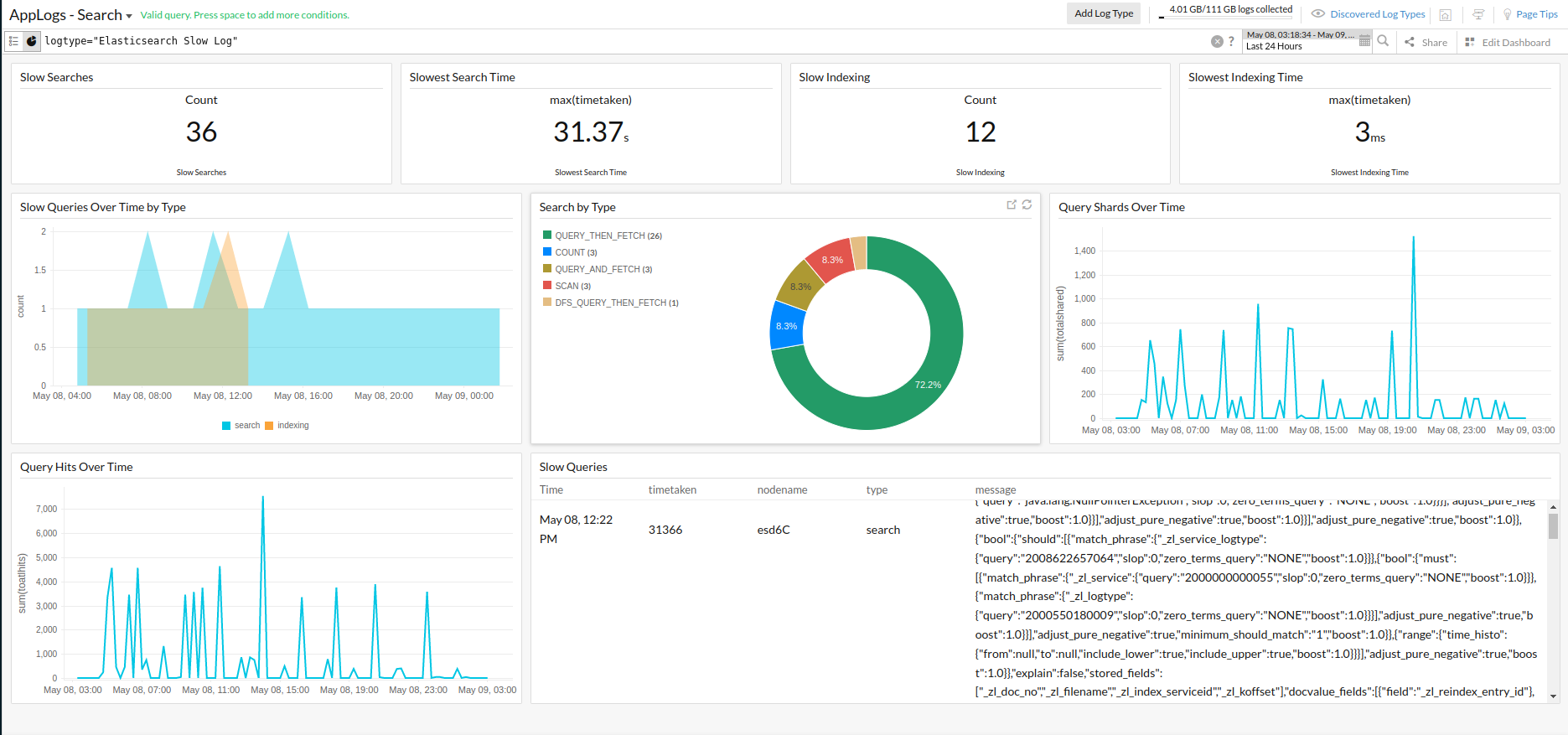
Elasticsearch 慢日志仪表板
AppLogs 为每种日志类型创建专属仪表板,并默认显示若干小组件。以下是 Elasticsearch 慢日志仪表板中可用的小组件列表:
- 慢搜索
- 最慢搜索时间
- 慢索引
- 最慢索引时间
- 按类型统计的随时间变化的慢查询
- 按类型搜索
- 随时间变化的查询分片
- 随时间变化的查询命中数
- 慢查询