
Gunicorn 日志
Web 服务器网关接口(WSGI)在 Web 服务器与 Web 应用程序之间构建请求-响应循环。Gunicorn 是 Python 应用程序的 WSGI 兼容 Web 服务器,主要写入两类日志文件:访问日志和错误日志。借助 Site24x7 的多日志模式支持,您可以为 Gunicorn 访问日志和 Gunicorn 错误日志创建单一日志类型,并在专属仪表板上可视化数据。了解更多关于 Site24x7 日志管理的信息。
入门
如需了解更多信息,请参阅添加日志类型帮助文档。
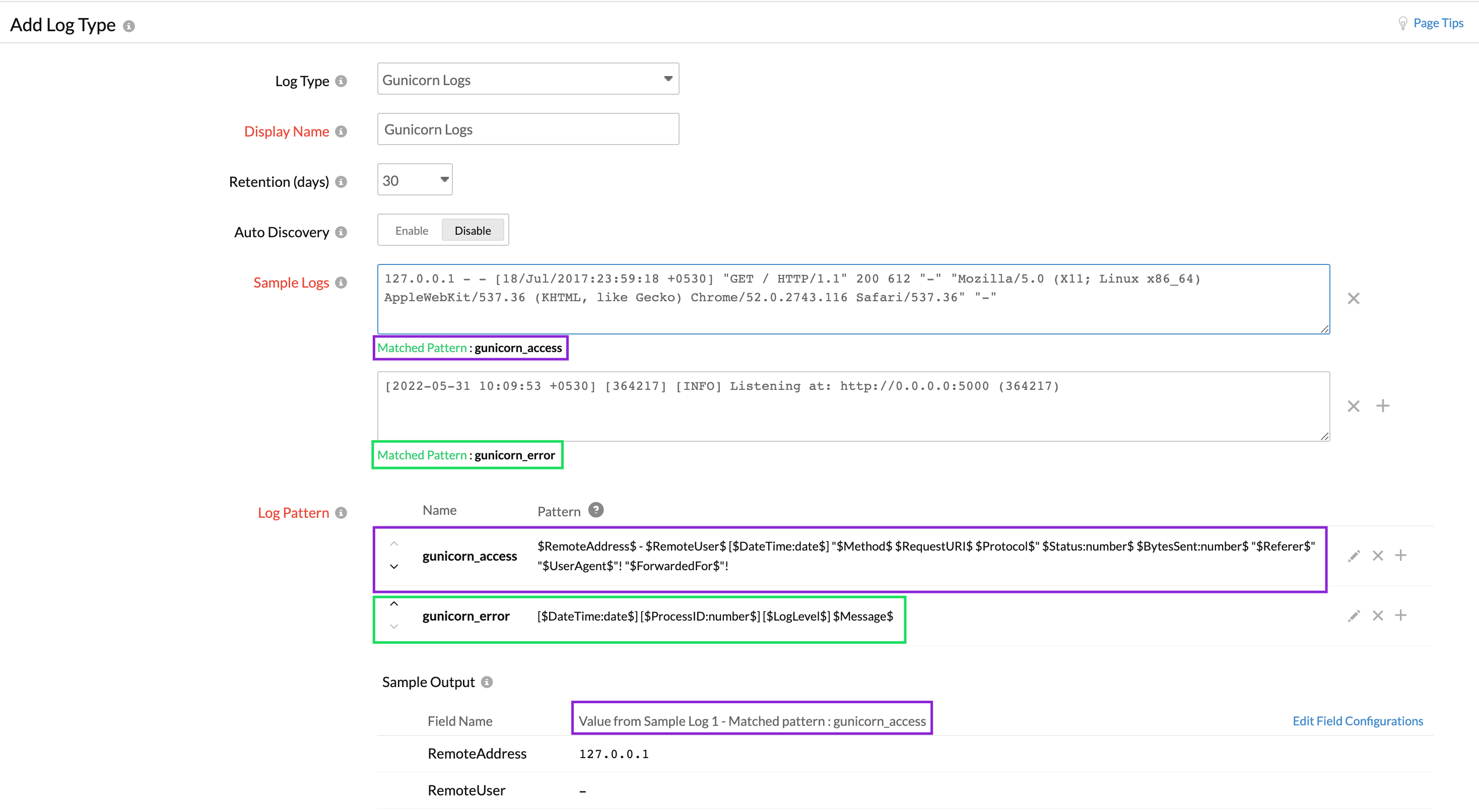
使用多日志模式支持,您可以将 access.log 文件和 error.log 文件中不同的日志模式添加到单一 Gunicorn 日志类型下。
Gunicorn 访问日志(示例日志与日志模式)
以下是 Gunicorn 访问日志的示例日志和日志模式:
127.0.0.1 - - [18/Jul/2017:23:59:18 +0530] "GET / HTTP/1.1" 200 612 "-" "Mozilla/5.0 (X11; Linux x86_64) AppleWebKit/537.36 (KHTML, like Gecko) Chrome/52.0.2743.116 Safari/537.36" "-"
$RemoteAddress$ - $RemoteUser$ [$DateTime:date$] "$Method$ $RequestURI$ $Protocol$" $Status:number$ $BytesSent:number$ "$Referer$" "$UserAgent$"! "$ForwardedFor$"!
该日志被拆分为若干字段,每个字段将提取对应的值,然后上传至 Site24x7。
| 字段名称 | 字段值 |
| RemoteAddress | 127.0.0.1 |
| RemoteUser | - |
| DateTime | 18/Jul/2017:23:59:18 +0530 |
| Method | GET |
| RequestURI | / |
| Protocol | HTTP/1.1 |
| Status | 200 |
| BytesSent | 612 |
| Referer | - |
| UserAgent | Mozilla/5.0 (X11; Linux x86_64) AppleWebKit/537.36 (KHTML, like Gecko) Chrome/52.0.2743.116 Safari/537.36 |
| ForwardedFor | - |
Gunicorn 错误日志(示例日志与日志模式)
以下是 Gunicorn 错误日志的示例日志和日志模式:
[2022-05-31 10:09:53 +0530] [364217] [INFO] Listening at: http://0.0.0.0:5000 (364217)
[$DateTime:date$] [$ProcessID:number$] [$LogLevel$] $Message$
该日志被拆分为若干字段,每个字段将提取对应的值,然后上传至 Site24x7。
| 字段名称 | 字段值 |
| DateTime | 2022-05-31 10:09:53 +0530 |
| ProcessID | 364217 |
| LogLevel | INFO |
| Message | Listening at: http://0.0.0.0:5000 (364217) |
您可以在单一仪表板上可视化访问日志和错误日志数据。
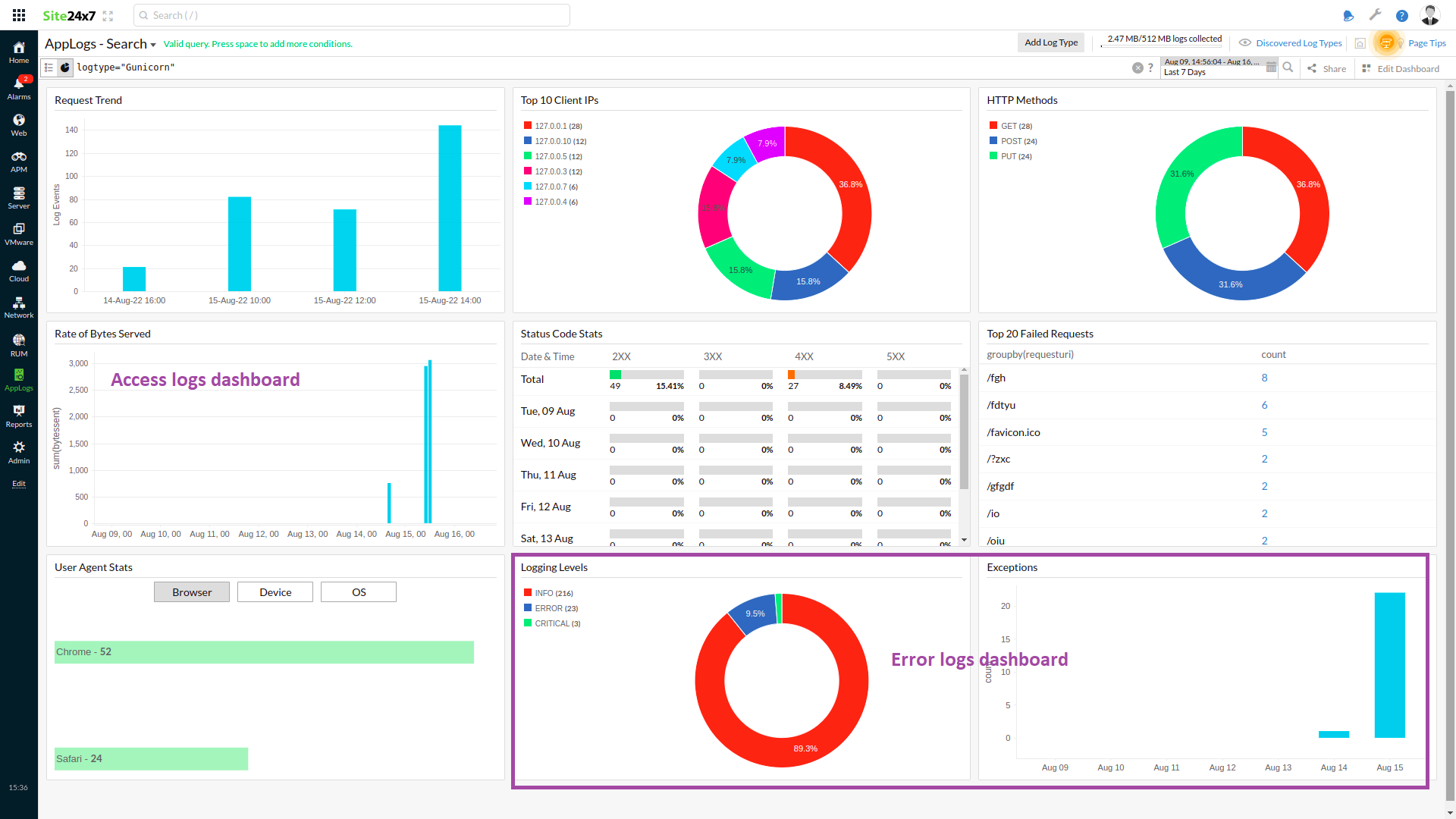
您还可以在查询语言中指定日志模式名称,以筛选特定日志模式的数据。例如,您可以使用以下查询筛选访问日志模式:
logtype="Gunicorn" and logpattern_name="gunicorn_access"
其中,gunicorn_access 是您在创建日志类型时设置的匹配模式名称。