
导出和共享日志
Site24x7 提供强大的日志管理功能,支持导出日志数据以供进一步分析或共享。您可以以 CSV 格式下载日志条目,为报表生成、故障排除和深度洞察提供灵活性。您可以导出的日志条目数量取决于您的订阅计划——高级计划每次最多支持导出一百万条条目,其他计划最多支持 100,000 条。
导出日志
导出日志的步骤:
- 登录 Site24x7。
- 导航至 AppLogs。
- 输入查询并按 Enter 或点击搜索
 图标。
图标。 - 点击共享
 图标。如果未找到数据,则共享选项不可用。
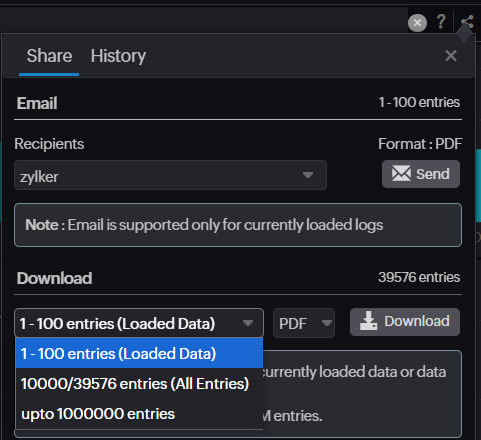
 - 选择要下载或导出的日志条目:
- 已加载数据:以 CSV 或 PDF 格式下载客户端中当前加载的日志条目。
- 所有条目:以 CSV 格式下载最多 10,000 条日志条目。
- 导出(最多允许的条目数):以 CSV 格式导出日志数据。
- 点击下载按钮。
Note
- PDF 格式仅适用于已加载数据选项。CSV 格式适用于所有其他选项。
- 导出功能仅适用于专业版(最多 100,000 条)和企业版(最多一百万条)账户。
- 导出选项仅供具有管理员、超级管理员或操作员角色的用户访问。

导出历史记录
历史记录选项卡提供所有以往日志导出的记录。在此选项卡中,您可以:
- 查看每次导出的日期和时间。
- 再次下载之前导出的日志数据。
导出的日志数据将保留五天,您可以在此期间再次下载。
如需有关导出日志的任何帮助,请联系我们的支持团队。
邮件选项
您可以以 PDF 格式导出日志并通过邮件共享,但此方式仅支持当前在界面中加载的日志。此选项适用于直接从系统快速共享日志数据。
通过 REST API 导出超过一百万条日志
在某些情况下,您可能需要导出超过一百万条日志条目。在这种情况下,您可以使用以下脚本通过 REST API 下载日志。请注意,由于每次 API 调用仅检索 1,000 条记录,下载过程可能较慢。该脚本通过递归调用 API 并将数据写入 CSV 文件来处理这一情况。
Note
请确保在执行脚本之前更新脚本中的用户输入部分以下载日志。
import os
##### USER INPUTS ###############################################
client_id = "1000.XXXXX"
client_secret = "XXXXXXXX"
code = "1000.XXXXX.YYYYYY"
#format DD-MM-YYYY HH:mm:ss
start_time = "11-11-2024 00:00:01"
end_time = "11-11-2024 23:59:59"
#change the query and delimit the characters wherever applicable
query = "logtype=\"Infrastructure Events\""
#change the location to where the output must be stored
# if the following value is to be changed give the value as string example  "/home/user/Documents/Project/Bulk_Export"
destination_path = os.getcwd()
#change the name of the output file
filename = "output"
##################################################################
import time
import re
try:
    import requests
except ImportError:
    try:
        os.system('python3 -m pip install requests')
        import requests
    except Exception as e:
        print(e)
global access_token
path = os.path.join(destination_path, "output")
if not os.path.exists(path):
    os.mkdir(path)
else:
    for each_file in os.listdir(path):
        if not each_file.endswith(".txt"):
            os.remove("{}/{}".format(path,each_file))
access_token_payload = {
    "client_id" : client_id,
    "client_secret" : client_secret
}
auth_token_url = "https://accounts.zoho.com/oauth/v2/token?"

def get_data():

    global access_token

    data_exclusion = ("_zl","s247","inode")
    query_params = {"query":query}

    print("Starting export")

    while True:

        print("Executing query")
        r = requests.get('https://www.site24x7.com/api/applog/search/{}/{}/1-1000/desc?'.format(start_time,end_time), headers={'Authorization': access_token},params=query_params)
        if r.status_code == 200 and (int(r.json()["data"]["ErrorCode"]) == 0):

            print("Downloading...")

            f = open("{}/{}.csv".format(path,filename), "a")
            total = int(r.json()["data"]["numFound"])
            csv_headers = []
            for iterations in range(0,((total // 1000) + ((total % 1000) > 0))):
                response = requests.get("https://www.site24x7.com/api/applog/search/{}/{}/{}-{}/desc?".format(start_time,end_time,(iterations*1000)+1,(iterations+1)*1000), headers={'Authorization':access_token },params=query_params)

                if response.status_code == 200 and (int(r.json()["data"]["ErrorCode"]) == 0):

                    if iterations == 0:
                        for field_key in response.json()['data']['docs'][0]:
                            if not field_key.startswith(data_exclusion):
                                csv_headers.append(field_key)
                        f.write(','.join(csv_headers)+"\n")

                    for rows in response.json()['data']['docs']:
                        rowData = ''
                        for field_key in csv_headers:
                            rowData =  str(rowData) + '"' +str(rows[field_key]).replace('"','""') +'"' + ','
                        rowData = rowData.rstrip(rowData[-1])
                        f.write(rowData+"\n")
                time.sleep(1)
            f.close()
            print("Export successfully completed")
            break

        elif r.status_code == 401:
            get_access_token()

        else:
            print("Error while retrieving data")
            break

def get_access_token():

    global access_token
    access_token_response = requests.post(url=auth_token_url,params=access_token_payload)
    if access_token_response.status_code == 200 and ("error" not in str(access_token_response.content)):
        access_token = "Zoho-oauthtoken " + access_token_response.json()["access_token"]
    else:
        print("Error while fetching access token - ", str(access_token_response.content))
        exit()
def get_refresh_token():
    refresh_token_payload = access_token_payload.copy()
    refresh_token_payload.update({
        "grant_type" : "authorization_code",
        "code" : code
        })

    refresh_token_response = requests.post(url=auth_token_url,params=refresh_token_payload)

    if refresh_token_response.status_code == 200 and ("error" not in str(refresh_token_response.content)):
        access_token_payload["grant_type"] = "refresh_token"
        access_token_payload["refresh_token"] = refresh_token_response.json()["refresh_token"]
        rt_file = open("{}/{}.txt".format(path,"refresh_token"), "w")
        rt_file.write(access_token_payload["refresh_token"])
        rt_file.close
    else:
        print("Error while fetching refresh token - ",str(refresh_token_response.content))
        exit()
if __name__ == "__main__":
    if not os.path.exists("{}/refresh_token.txt".format(path)):
        get_refresh_token()
    else:
        access_token_payload["grant_type"] = "refresh_token"
        access_token_payload["refresh_token"] = open("{}/refresh_token.txt".format(path), 'r').read()
    get_access_token()
    get_data()
相关文章
短链接已复制!